
Genie™ and Apex® Products Operating System and Database Qualifications
Genie and Apex Products Compatibility Matrix
Last Updated: December 2025
| Base Model/Name | Windows 10 | Windows 11 | Windows Server 2019 | Windows Server 2022 | Windows Server 2025 | SQL Server 2019 | SQL Server 2022 | Oracle 19c |
|---|---|---|---|---|---|---|---|---|
| Genie / Genie™ Spectroscopy Suite
Version: 4.1 Required Genie Version: - |
✓ | ✓ | ✓ | ✓ | ✓ | |||
| GenieLite / GenieLite Basic Spectroscopy
Version: 4.1 Required Genie Version: - |
✓ | ✓ | ||||||
| ISOCS / ISOCS™/LabSOCS™ Mathematical Efficiency Software
Version: 4.5 Required Genie Version: 4.1 |
✓ | ✓ | ✓ | ✓ | ||||
| Apex-InVivo / Apex-InVivo™ Desktop / Workstation
Version: 1.3 Required Genie Version: 4.1 |
✓ | ✓ | SSE 2014 | SSE 2022 | ||||
| AIV-Server / Apex-InVivo Server Software
Version: 1.3 Required Genie Version: 4.1 |
✓ | ✓ | ✓ | |||||
| AIV-Review / Apex-InVivo Review Client
Version: 1.3 Required Genie Version: 4.1 |
✓ | |||||||
| Apex-Alpha / Apex-Alpha™ Software
Version: 1.4 Required Genie Version: 4.1 |
✓ | ✓ | ✓ | ✓ | ||||
| MGAU / Multi-Group Analysis for Uranium (MGAU™) Software
Version: 4.3 Required Genie Version: 4.0 |
✓ | ✓ | ||||||
| MGA / Multi-Group Analysis (MGA™) Software
Version: 10.1 Required Genie Version: 4.0 |
✓ | ✓ | ||||||
| Apex-Gamma / Apex-Gamma™ Software
Version: 1.6 Required Genie Version: 4.0 |
✓ | ✓ | ✓ | ✓ | ✓ | SSE 2014 | SSE 2022 | ✓ |
| Apex-Guard / Apex-Guard™ Option
Version: 1.2 Required Genie Version: 4.0 |
✓ | ✓ | ✓ | ✓ | ✓ | SSE 2014 | SSE 2022 |
Product qualification, at time of qualification, for each indicated operating system and configuration is in compliance with the following standards:
ISO 9001, ASME NQA-1c-1992, ASME NQA-2-1990 Part 2.7, and latest revision of IEEE 730.1.
Please note: NDA 2000™ software will continue to require Genie 2000 Version 3.4.1 until further notice.
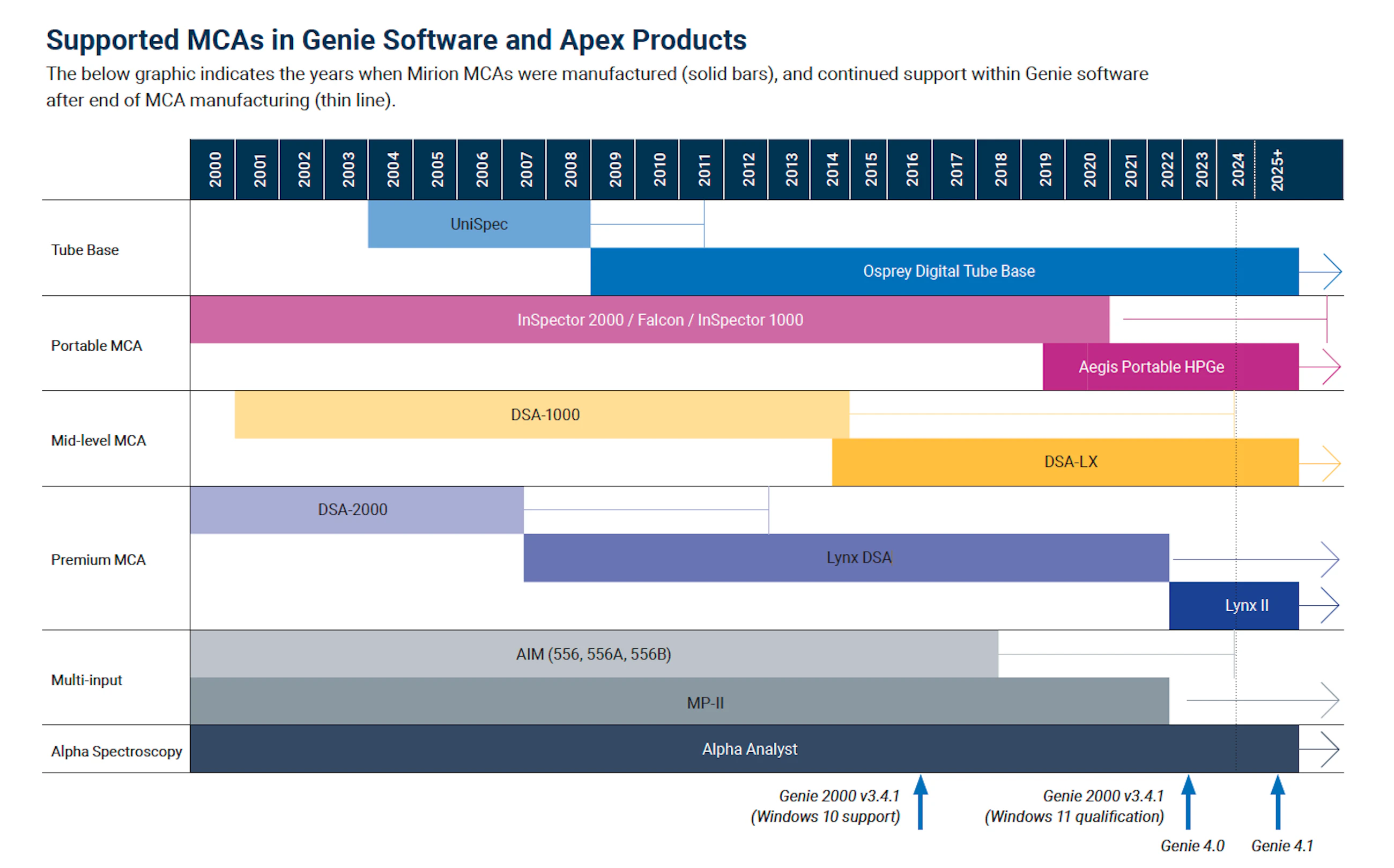
Supported MCAs in Genie Software and Apex Products
The below graphic indicates the years when Mirion MCAs were manufactured (solid bars), and continued support within Genie software after end of MCA manufacturing (thin line).
Genie software is qualified with the following devices:
Osprey® DTB
InSpector™ 2000
Falcon 5000® Instrument
DSA-LX® DSA
Lynx® MCA
Lynx® II DSA
Multiport II™ MCA
Alpha Analyst™ Spectrometer
Aegis™ Portable HPGe Spectrometer
Sample Changers
Recommended Windows PC Requirements
The following tables can be used to guide users on recommended computer system specifications to be used when operating the Genie and Apex software suites. These specifications are also appropriate for the Horizon® application.
Suggested PC Requirements for Genie Applications, Including Apex Products (Desktop and Client Systems)
| Recommended | Notes | |
|---|---|---|
| Operating System | Windows 11 64-bit | Windows 10 is the minimum required for most products currently provided. Windows 11 has also been qualified and is the current recommendation for most client and desktop applications. Review the qualification matrix for which OS is supported for each application. |
| Memory (RAM) | 16 GB to 32 GB | RAM helps performance of both the server components and the SQL Server database (if you run SQL Server on the same computer). 64-bit server operating systems can access up to 2 TB RAM. 32 GB is recommended for good performance and longevity of the computer – in particular if SQL Server is running on this computer. |
| Processor | i7 or Xeon processor is recommended for more efficient computational throughput | An i7 processor is recommended. Additional cores are recommended especially if using Apex-Gamma platform’s LabSOCS™ Variable Geometry feature or Cascade Summing Correction. An i5 processor is also sufficient, although performance issues may be observed. |
| Hard Drive | Two 1 TB drives or larger configured as RAID1 | The server stores all count results and may even have the database on it. For sites that count under 10,000 samples a year, 1 TB drive is sufficient and will hold 15 years of data or more. Sites that count over 10,000 per year should use 2 TB drives. In both cases, we recommend installing two matching drives configured with RAID1 (mirrored) to increase reliability without reducing performance. For all applications, it is recommended to have a minimum of 300 GB. |
| Monitor/Video | 1920 x 1080 or better | It is recommended to use a 27 inch or larger monitor size for adequate viewing of reports and spectra. However, smaller screen sizes (such as the Microsoft Surface Pro®) are also supported. |
| Database (Desktop systems only) | SQL Server 2022 is recommended for longevity | Desktop systems ship with SQL Server Express. This is a free version of SQL Server and it has a 10 GB size limit. If the system is expected to be used for many years and process a lot of counts, the customer should upgrade to a full version of SQL Server such as the Standard Edition. See the compatibility matrix to choose the proper version of SQL Server. It is strongly recommended to include a full version of SQL Server when buying the PC, so it can be integrated at the factory and to avoid loss of data and system downtime if the Express version runs out of space in the future. |
Suggested PC Requirements for Genie Applications, Including Apex Products (Server Systems)
| Recommended | Notes | |
|---|---|---|
| Operating System | Windows Server 2022 | The Application server is recommended to run on a Windows Server platform. |
| Memory (RAM) | 16 GB to 32 GB | RAM helps performance of both the Server components and the SQL Server database (if you run SQL Server on the same computer). 64-bit server operating systems can access up to 2 TB RAM. 32 GB is recommended for good performance and longevity of the computer – in particular if SQL Server is running on this computer. |
| Processor | i7 or Xeon processor is recommended for more efficient computational throughput | i7 processors are recommended. Additional cores are recommended especially if using Apex-Gamma platform’s LabSOCS Variable Geometry feature or Cascade Summing Correction. An i5 processor is also sufficient, although performance issues may be observed. If using an Oracle database, additional resources may be required. |
| Hard Drive | Two 1 TB drives or larger configured as RAID1 | The server stores all count results and may even have the database on it. For sites that count under 10,000 samples a year, 1 TB drive is sufficient and will hold 15 years of data or more. Sites that count over 10,000 per year should use 2 TB drives. In both cases, we recommend installing two matching drives configured with RAID1 (mirrored) to increase reliability without reducing performance. For all applications, it is recommended to have a minimum of 300 GB. |
| Monitor/Video | 1920 x 1080 or better | If the server will be used very infrequently (or never) for running the client application, then a minimum vertical resolution of 1024 is fine. If you plan to sit at this computer more often, we recommend HD 1080p (1920 x 1080) or WUXGA (1920 x 1200) resolution or better. |
| Database | The latest qualified database for each respective product is recommended choice for longevity | The application server is a central repository of all counts for all detectors. SQL Server 2022 is now recommended. If there is no preference stated, use of the Standard Edition is fine because the server does not need any of the advanced features in the Enterprise edition. |